
What Is Property Management Software? A Practical Guide
September 21, 2026
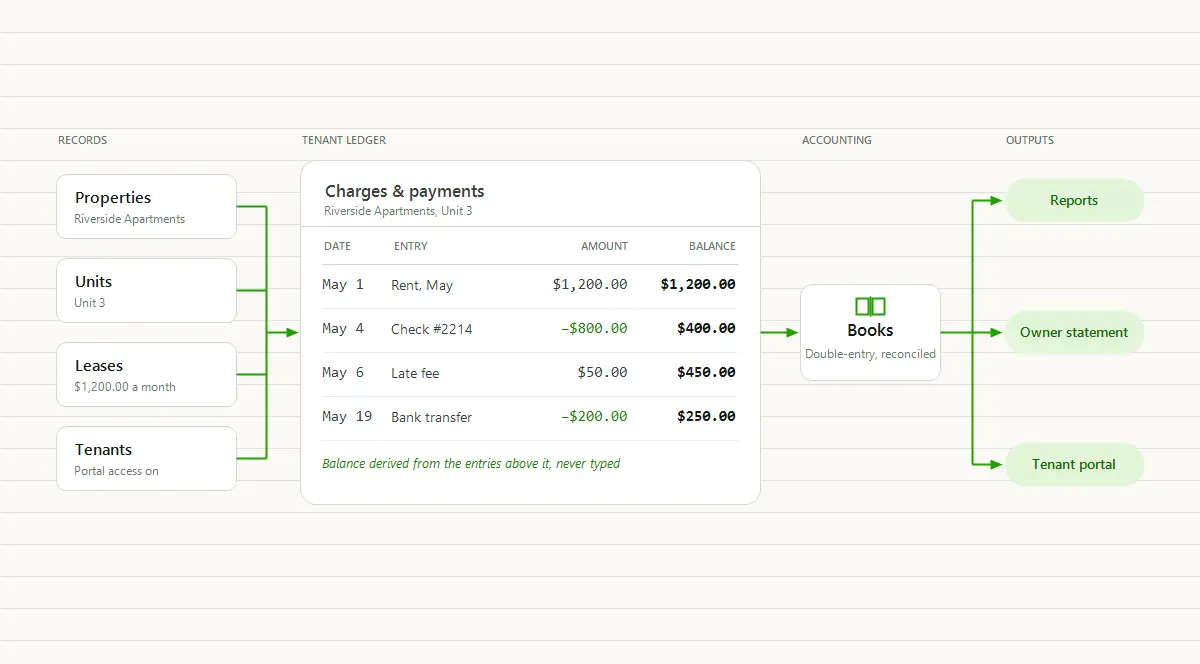
Most rentals run on a pile. There is a spreadsheet with a tab per property, the bank app you check on the 3rd to see who paid, a text thread with each tenant, a folder of signed leases somewhere in your email, and a shoebox where receipts go to wait for April. It works, mostly, until the month it doesn’t: a tenant disputes a balance, an owner asks what their property netted, or your accountant asks for the year and you realize the year is in six places. That pile is what property management software exists to replace.
At some point you type the question into a search box: is there software for this, and do I need it? The first answer is yes. The second depends on what your records have to do for you, which is what this guide is for.
It covers what property management software is and is not, what it replaces, how it handles leases, rent, accounting, owners, maintenance, and reports, who uses it, how to tell whether you need it, and what it costs.
What is property management software?
Property management software is one system that keeps the records for rental property: the properties and their units, the leases and the tenants on them, what each tenant owes and has paid, and the money moving in and out. From those records it builds the statements and reports you would otherwise assemble by hand.
That second sentence is the point. A spreadsheet holds records. Property management software holds records and derives everything else from them, so a tenant’s balance, the rent roll, the owner’s monthly statement, and the year-end numbers are all views of the same entries rather than separate documents you maintain.
One distinction worth drawing. Property management software is a tool an owner or a manager uses themselves. A property management company is a business you hire to run the building for a fee. The company probably uses the software. You can too, without hiring anyone.
What it replaces
For most self-managing landlords the thing it replaces is the spreadsheet. The case against it is not that it can’t hold the data. It breaks the first time a payment gets complicated (a partial payment, a waived fee, a balance carrying across a month), and it produces nothing on its own. That argument is its own post; the short version is the table below.
| The task | Where it lives today | Where it lives in software |
|---|---|---|
| Rent due dates | A calendar reminder and memory | Recurring charges that post on schedule per lease |
| Who has paid and who has not | The bank app, cross-checked against a spreadsheet | A running balance per tenant and a delinquency report |
| Security deposits | A separate tab, or a number in your head | A liability recorded on the lease from move-in to return |
| Expenses by property | Receipts in a drawer, sorted in April | Bills and payments recorded against the property when they happen |
| The monthly owner report | A spreadsheet rebuilt each month | An owner statement generated from the books |
| Maintenance history | Texts and a vendor’s invoices | Work orders with dates, vendor, and notes per property and unit, and the vendor’s bill recorded against the property |
| Tax preparation | A weekend of reconstruction | Reports run from records kept all year |
Properties, units, leases, and tenants
Everything in property management software hangs on one structure, and it is the reason the reports work.
A property contains one or more units. Oak Street Duplex has an upstairs and a downstairs; Riverside Apartments has a building full of them. A unit has a lease, with a start date, an end date, a rent amount, and a security deposit. A lease has one or more tenants, which is what lets a charge be billed to one named tenant on a shared lease rather than to the unit as a whole. A spreadsheet flattens all of that into one row per unit. Software keeps it as four linked records, and the links are what make everything downstream possible.
From that structure come the events the software handles for you:
- Recurring rent charges post on schedule. Set the amount, frequency, and dates once, and each period’s rent charge appears on the lease when it comes due. If you are already a TenantLedger customer, set up recurring charges covers the settings.
- Move-in and move-out are dated events on the lease: a prorated first month and a deposit collected on the way in; a final balance, a deposit returned or applied, and a vacant unit on the way out.
- Rent increases are recorded against the lease with an effective date, so the history shows what the rent was and when it changed.
- Partial payments apply against the charge without altering it. The charge still says what was owed on the 1st, the payment says what arrived on the 4th, and the difference is what is still due.
None of this is exotic: the ordinary events of a lease, recorded where they happened rather than as a note in the margin.
Rent charges, payments, and the tenant ledger
The tenant ledger is the record most landlords think they already keep. It is the dated list, per tenant, of every charge (rent, a late fee, a utility reimbursement), every payment (with a date, an amount, and a method), and every credit (a waived fee, a concession). The balance after each line is charges minus payments and credits. The balance is derived from the entries above it, never typed, which is the one thing a spreadsheet grid does not do and the reason a ledger survives a dispute. The fuller definition, with a worked example, is on the rent ledger page.
Then there is how the money arrives. In TenantLedger’s tabulation of the Census Bureau’s 2024 Rental Housing Finance Survey, checks and money orders are still the most common way U.S. rental properties take rent, accepted at 53.8% of properties that reported a method, while only 34.8% accept online payment (the full breakdown is in rent collection statistics). The properties still on paper are overwhelmingly the small ones, and small properties are most of the market.
Property management software closes that gap with a tenant portal. The tenant signs in, sees the balance and the history behind it, and pays by card or bank transfer. The payment lands on the ledger without you keying it in, and the “did you get my check” conversations mostly stop, because the tenant sees the same record you see. Here is how a tenant portal with online payment works.
Accounting and bank reconciliation
This is the line that divides the category. An income-and-expense log records money in and money out and totals them. It is enough for a Schedule E and not much else. Double-entry books record every transaction against a chart of accounts: a rent payment increases cash and reduces what the tenant owes, a deposit collected increases cash and creates a liability, a bill paid reduces cash and records an expense against that property. The result is a set of books that can produce a balance sheet, not just a profit figure, and be checked against the outside world.
The chart of accounts is the list of categories every entry posts to: rent income, late fee income, repairs, insurance, security deposits held. It is what turns “money came in” into “rent income for Oak Street Duplex,” and it is what your tax return and your owner statements roll up from. Setting up a chart of accounts for rental properties walks through a starting list.
Bank reconciliation is the monthly check of the books against the bank statement: every deposit and withdrawal on the statement matched to an entry in the books, and every difference explained. It is how you catch the payment you recorded but never deposited, the bill paid twice, and the online payment that never landed. Bank reconciliation for landlords covers the routine.
This is also where cheaper tools stop. A rent-tracking app with a payments feature can tell you who paid. It usually cannot reconcile, produce a balance sheet, or show deposits held as a liability, because it has no books underneath. Software with accounting built for rental property does all three, and the difference shows up the first time an owner or a CPA looks closely.
Owner statements and portals
If you manage property for other people, the monthly owner statement is where trust is won or lost. A complete one carries the property’s income for the period, its expenses by category, the management fee, the net, and what was distributed to the owner. What should be on a monthly owner statement goes line by line.
In a spreadsheet the statement is rebuilt every month on top of the last one, so an error in the spring carries through the rest of the year unnoticed. In property management software the statement is generated from the same ledger that recorded the charges and bills, so it cannot drift from the books, and it is ready whenever the owner asks.
The other half is the owner portal: a read-only sign-in where each owner sees a dashboard of their own properties, leases, and financials, and nothing belonging to any other owner. The “how did my property do” call becomes a link. Owner statements and the owner portal describes both.
Maintenance, vendors, and bills
Maintenance is where a lot of a property’s money goes, and where the record usually lives in a text thread. Property management software gives it a home on the manager’s side.
A work order is the record of one job: the property and unit, who reported it, the priority, the scheduled date, the vendor or staff member assigned, and notes until it is marked complete. Kept consistently, work orders become a maintenance history per property and unit, which is what you want when the same faucet fails a third time or an insurer asks when the water heater was last serviced.
Vendors and bills close the loop on cost. A bill is recorded against the property and the vendor, several bills can be paid at once, and a check can be printed if that is how the vendor gets paid. Because the bill posts to the books, expense reporting by property is a side effect of paying it, and the vendor summary at year end is already there.
Reports
Reports are what the records are for. Five answer most of the questions:
- Rent roll. Every lease, its unit and tenant, the lease dates, the scheduled rent, and the current balance: the snapshot a lender or a buyer asks for. Rent roll vs. rent ledger explains how it differs from the tenant-level history.
- Delinquency. Who is behind, by how much, and for how long, in aging buckets. This is the list you work from on the 6th.
- Tenant statement. One tenant’s charges, payments, and running balance over a date range: what you hand a tenant who disputes a fee or a lender verifying rent.
- Cash flow. Money in and money out by category for a period, by property or across the portfolio.
- Balance sheet. What you hold and what you owe at a point in time, including the security deposits you are liable to return.
The common thread is that none of them are built. They are run, from the same entries, and they agree with each other because they have to.
Who uses property management software
The people who use it are mostly not companies. In the 2024 Rental Housing Finance Survey, 82.9% of U.S. rental properties contain a single unit, individual investors own 59.6% of those, and REITs and real estate corporations combined own just 1.8%. Institutions concentrate in large apartment buildings. The rest of the market, which is most of it, belongs to individuals, and those are the people running on the pile from the first paragraph.
- Self-managing landlords with a few rentals or a growing portfolio, who want the rent tracked, the deposits straight, and the tax reports ready without becoming bookkeepers.
- Property managers who report to owner clients and need statements, owner portals, and books that hold up to scrutiny. How to run a property management company covers the operational systems behind that, screening through owner reporting.
- Self-managed HOA boards, where dues are recurring charges, homeowners pay through a portal, and the books have to survive a change of treasurer.
- Small commercial owners, where leases carry base rent plus pass-through charges and the buildings run on vendors and bills.
What property management software is not
Three things it gets confused with:
- It is not a property management company. Nobody shows up to fix the faucet or chase the rent. The software keeps the record; you or your manager do the work.
- It is not a bookkeeper or a CPA. It keeps the books, but your accountant still files the return, handles depreciation, and answers the entity questions, working from a balance sheet instead of a shoebox.
- It is not a listing site. It does not push a vacancy out to the listing sites or find you an applicant. It can host your own property site, but the applicant traffic comes from elsewhere, and the record begins in earnest once there is a lease.
How to tell if you need it
A few signs the pile has stopped working:
- You cannot say what a specific tenant owes right now without adding something up.
- A partial payment or a waived fee means editing a cell rather than recording a new entry.
- You are holding security deposits and would have to look up which tenant each one belongs to.
- An owner, a lender, or your accountant asked for a statement and it took you an evening.
- Tenants ask whether you got their payment, and you have to check the bank to answer.
Any one of those is a cost paid in time. Two or three together usually mean the records are already unreliable and you have not found out yet.
What it costs and how plans are structured
Three pricing models cover most of the market. Per unit per month, where the price scales with the portfolio. Flat monthly, one price regardless of size, often in tiers that unlock features as you go up. And free plans, which earn on the rent flowing through them: a markup on payment processing, a fee charged to the tenant, or paid add-ons for the pieces you end up needing.
None of these is wrong, but read the terms: which features sit behind a higher tier, whether there is an onboarding fee or an annual contract, and, on a free plan, what the processing costs, because a markup on every rent payment is a subscription paid by your tenants, and it grows with your rent.
TenantLedger’s published terms are simple enough to state: a price from $20 a month that scales with the size of your portfolio, every feature included at every size, no contract, and cancel anytime.
How TenantLedger fits
TenantLedger is property management software of the kind described above, built around the accounting. The pieces:
- Real double-entry accounting in every plan. Every charge, payment, credit, deposit, and bill posts to a ledger against a chart of accounts you control, with bank reconciliation against your monthly statements.
- Online rent through your own Stripe account. You connect your Stripe account, tenants pay by card or bank transfer from their portal, and rent settles there. TenantLedger adds no markup to Stripe’s standard fees and never holds your money.
- Owner statements and a read-only owner portal. Statements generate from the live books on demand, and each owner signs in to see only their own properties.
- A tenant portal where tenants see their balance and history and pay online, with access you enable per tenant.
- QuickBooks Online export, when you choose to send it. Connect once, then push the period across after you have reviewed it.
- A marketing website builder included in every plan, for a company site or a property site on your own domain.
The bottom line
Property management software is one system that keeps the records for rental property and derives everything else from those records: the balances, the statements, and the reports. It replaces the pile, not the landlord. Whether you need it comes down to whether your current records can still answer the questions your tenants, owners, and accountant ask.
If you would rather the records kept themselves from the leases you already have, TenantLedger’s 14-day free trial takes an evening to set up: start here, no credit card required.
Common questions
What is property management software?
Property management software is one system that keeps the records for rental property: properties and units, leases and tenants, the charges each tenant owes and the payments they have made, and the money going in and out. From those records it builds statements and reports, such as a rent roll or an owner statement, so you never assemble them by hand. It is a tool an owner or manager uses themselves, not a company you hire.
What does property management software do?
It tracks rent charges and payments on a running ledger per tenant, posts recurring rent on schedule, records security deposits, and gives tenants a portal to see their balance and pay online. It keeps expenses, bills, and vendors by property, logs maintenance work orders, and in the better tools keeps double-entry books you can reconcile against the bank. The reports, from the rent roll to the balance sheet, come out of those records.
What is the difference between property management software and a property management company?
A property management company is a business you hire to run your rentals for a fee, usually a share of the rent: they find tenants, collect rent, handle repairs, and send you a statement. Property management software is a tool you or your manager use to do that work yourselves, for a monthly subscription. Many management companies run their business on the software, so the two are not rivals. One is the service, the other is the record system.
Do I need property management software if I only have a few rentals?
Not on day one, and never because of a count. The test is whether your records still answer the questions that matter: what each tenant owes right now, which deposits you are holding, what a property cost you this year. When those answers take a scroll through texts and bank statements, or a spreadsheet only one person understands, software earns its keep. Some people with a few rentals want it for the tax-time reports alone.
Does property management software replace an accountant?
No. It keeps the books: every charge, payment, deposit, and bill is recorded and categorized as it happens, and the reports come out of that record. Your accountant still files the return, advises on depreciation and entity questions, and reviews anything unusual. What changes is what you hand them. Instead of a shoebox and a bank printout, they get a balance sheet, a cash flow report, and, if they prefer, the records exported to QuickBooks Online.
Can tenants pay rent through property management software?
Yes, when the software includes a tenant portal with online payment. The tenant signs in, sees the balance owed, and pays by card or bank transfer. The payment posts to their ledger without anyone re-keying it, which is the whole advantage over a payment app on the side. In TenantLedger the payment runs through your own Stripe account and settles there, and TenantLedger adds no markup to Stripe's standard fees.
How much does property management software cost?
Three pricing models are common: a price per unit per month, a flat monthly subscription, and free plans that earn their money on payment-processing markups and add-on fees. Watch for onboarding fees, tiers that hold accounting or owner statements behind a higher plan, and annual contracts. TenantLedger's published terms start at $20 a month with every feature included at every size, no contract, cancel anytime, and a 14-day free trial with no credit card.
Property management software with real accounting built in
Track your properties, leases, charges, and payments in one place.
14-day free trial · No credit card required