
Rent Roll vs. Rent Ledger: Differences, Examples, and Templates
August 18, 2026
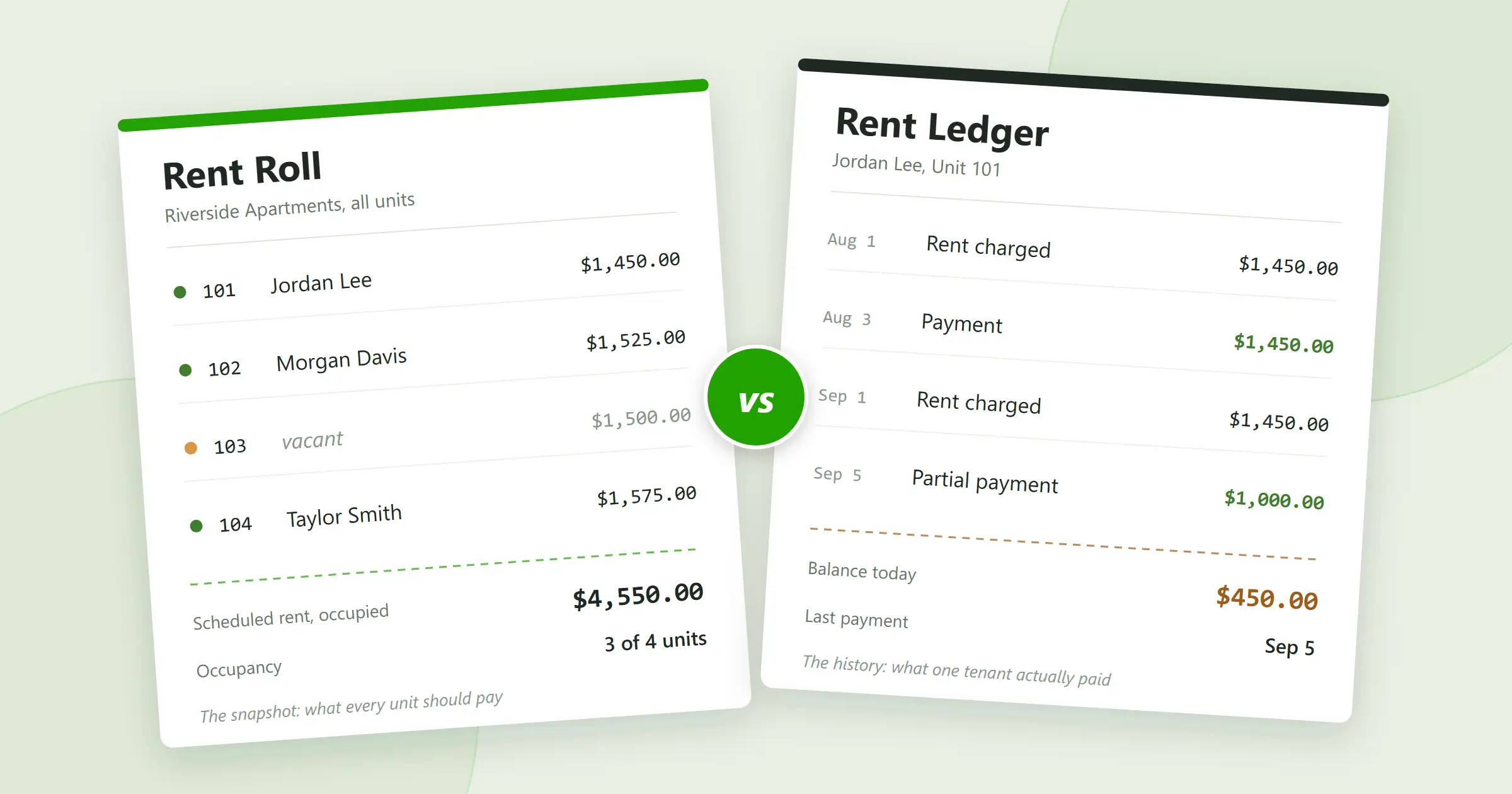
Ask five people in real estate what a rent roll is and you’ll get five overlapping answers, most of them tangled up with the rent ledger. The confusion is understandable, because the two records live in the same drawer: both track rent, both come up the moment a lender or a buyer starts asking questions, and both are documents you’re supposed to already have.
They answer different questions, though. A rent roll is the property-level snapshot: which units exist, who leases them, what each is scheduled to pay, and which are sitting empty. A rent ledger is the tenant-level history: what one tenant was charged, what they paid, and what they owe today. Here’s what belongs on a rent roll, what one looks like, how to create yours (there’s a free Excel template below), and when you need each record.
What is a rent roll?
A rent roll is a report that summarizes the tenants, rental units, lease terms, occupancy status, and scheduled rent for a rental property or portfolio. Unlike a rent ledger, which tracks the charges and payments that actually happened, a rent roll is a snapshot of the rental income a property is expected to generate.
It runs one row per unit, and for each unit it typically shows:
- Property and unit number
- Tenant name
- Lease start and expiration dates
- Scheduled monthly rent
- Other recurring charges, such as parking or pet rent
- Security deposit held
- Occupancy status
For a landlord with one duplex, the rent roll fits on an index card. For a property manager overseeing a few hundred units, it’s an operational report: the first place vacancies, expiring leases, and below-market rents become visible.
What is a rent roll in real estate?
In real estate transactions, the rent roll is the document that describes a property’s current leasing status and scheduled income. Lenders, buyers, and investors read it to answer a specific set of questions:
- How many units are occupied, and how many are vacant?
- What is each tenant scheduled to pay?
- When does each lease expire?
- What is the total scheduled monthly rent?
- Are any units rented well above or below the others?
What the rent roll can’t tell them is whether tenants actually paid. That’s the rent ledger’s job, which is why serious due diligence asks for both.
What does a rent roll look like?
A basic rent roll is a table with one row per unit. Here’s a sample rent roll for a fictional four-unit building, Riverside Apartments:
| Unit | Tenant | Lease start | Lease end | Monthly rent | Deposit | Status |
|---|---|---|---|---|---|---|
| 101 | Jordan Lee | Jan 1, 2026 | Dec 31, 2026 | $1,450.00 | $1,450.00 | Occupied |
| 102 | Morgan Davis | Mar 1, 2026 | Feb 28, 2027 | $1,525.00 | $1,525.00 | Occupied |
| 103 | $1,500.00 | Vacant | ||||
| 104 | Taylor Smith | Jul 1, 2026 | Jun 30, 2027 | $1,575.00 | $1,575.00 | Occupied |
That’s a complete rent roll example for a small building, and it already tells you the important things. Three units are occupied, one is sitting empty, and scheduled rent from the occupied units is $1,450.00 + $1,525.00 + $1,575.00 = $4,550.00 a month. Fill Unit 103 at its $1,500.00 asking rent and scheduled rent rises to $6,050.00. That at-a-glance arithmetic is most of the report’s value.
What goes on a rent roll
There’s no legally required format. A useful rent roll captures enough to understand each unit’s status without opening the lease file:
- Property and unit. Address, building, and unit number, plus unit type or bedroom count if it helps you tell units apart. Once you have more than one property, the property column stops you from ever reading the wrong row.
- Tenant. The name on the current lease. Keep phone numbers, emails, and anything sensitive in your tenant records instead; rent rolls get shared, and they should stay shareable.
- Lease dates. Start and expiration. Sorting by expiration date is how renewals stop sneaking up on you.
- Monthly rent. The current contractual rent. If tenants pay recurring extras, give each one its own column rather than folding everything into a single number.
- Security deposit. Commonly included so the total you’re holding is visible in one place. Deposit rules vary by state, so keep the separate deposit records your jurisdiction requires either way.
- Occupancy status. Occupied, vacant, notice given, pending move-in, under renovation. Whatever labels you pick, use them consistently.
Separate columns are what keep the difference between rent and everything else visible:
| Base rent | Pet rent | Parking | Total monthly charges |
|---|---|---|---|
| $1,500.00 | $50.00 | $75.00 | $1,625.00 |
Rent roll vs. rent ledger: what’s the difference?
The difference is scope. A rent roll covers many units at a moment in time. A rent ledger covers one tenant across time. One is a snapshot, the other is a history.
| Rent roll | Rent ledger |
|---|---|
| One row per unit or lease | One row per transaction |
| Shows scheduled rent | Shows charges and payments that happened |
| Includes lease dates | Includes transaction dates |
| Answers “what should this property collect?” | Answers “what does this tenant owe?” |
| Used for occupancy and income analysis | Used for payment history and disputes |
| Property-level reporting | Tenant-level accounting |
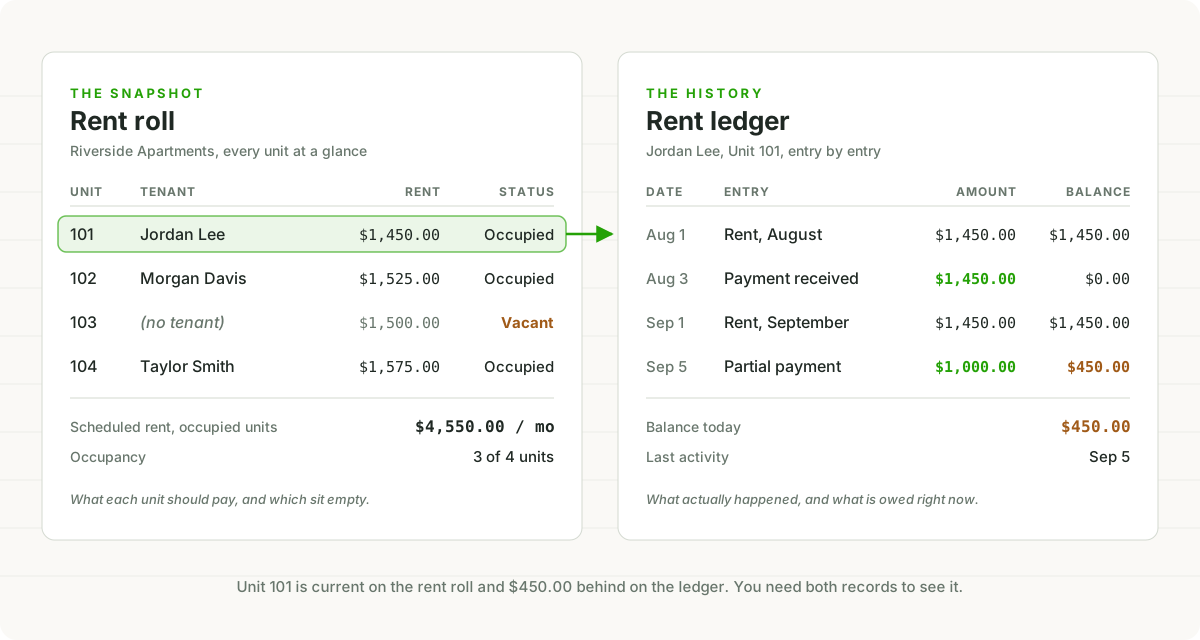
Here’s the same fact from both sides. The Riverside rent roll above says Unit 101 rents for $1,450.00 a month. Jordan Lee’s ledger says how that’s actually going:
| Date | Description | Charge | Payment | Balance |
|---|---|---|---|---|
| Aug 1 | Rent, August | $1,450.00 | $1,450.00 | |
| Aug 3 | Payment, bank transfer | $1,450.00 | $0.00 | |
| Sep 1 | Rent, September | $1,450.00 | $1,450.00 | |
| Sep 5 | Payment, bank transfer | $1,000.00 | $450.00 |
The rent roll says what’s supposed to happen; the ledger says what did. As of September 5, Unit 101 looks perfect on the rent roll and is $450.00 behind on the ledger. For what belongs in that tenant-level record, entry by entry, see the guide to keeping a rent payment history.
Rent roll vs. rent schedule
You’ll also hear the term “rent schedule,” especially from lenders. In most contexts it describes the same report: units, tenants, leases, scheduled rent. (An appraiser’s comparable rent schedule is different: that’s the appraiser’s own market-rent analysis, not a report you provide.) Terminology drifts between landlords, brokers, lenders, and accountants, so don’t get hung up on the label. Ask what columns they want and hand them the report that has those columns.
Why a rent roll matters
A rent roll earns its keep in a handful of recurring moments:
- Occupancy at a glance. Every vacant row is income the property isn’t producing. On a larger portfolio, the rent roll is the fastest way to spot them all at once.
- Lease expirations. Sorted by end date, the rent roll is your renewal calendar. Reviewing it monthly is what keeps an expiration from becoming a surprise vacancy.
- Scheduled income. A ten-unit property with scheduled rents totaling $15,000.00 a month is scheduled to gross $180,000.00 a year. Actual collections will differ, thanks to vacancy, missed payments, and concessions, which is exactly why the rent roll pairs with the ledgers.
- Rent comparisons across units. If three similar one-bedrooms rent for $1,500.00 and a fourth rents for $1,250.00, that gap deserves a look at renewal time, within whatever the lease and local law allow.
- Financing and sales. A lender or buyer evaluating an income property asks for the rent roll early, usually alongside leases, operating statements, and payment histories. The buyer is running the same arithmetic as the rental cash flow calculator: scheduled rents in, vacancy, expenses, and debt out.
If you manage properties for owners, expect to produce it on request too. It’s often the first report an owner wants to see.
Residential vs. commercial rent rolls
The structure is the same; the columns differ. A residential rent roll tracks units, tenants, lease dates, and flat monthly rents. A rent roll for commercial properties usually adds square footage, rent per square foot, lease type, escalation schedules, and the expense reimbursements a tenant pays on top of base rent, such as taxes, insurance, and common-area maintenance.
The vacancy math also cuts deeper on the commercial side. Losing one tenant in a four-suite building removes a quarter of scheduled income in a single move, so commercial rent rolls get read with lease expirations and renewal options front and center.
How to create a rent roll
Building one from scratch takes six steps and less than an evening:
- List every unit. One row each, including the vacant ones. A rent roll that only shows occupied units is an occupancy report with the bad news removed.
- Add the current tenant. The name on the lease. Sensitive details stay in your tenant records, not on a report you might email to a lender.
- Enter lease start and end dates. These make the roll sortable by expiration, which is the single most useful sort it has.
- Enter the scheduled rent. The current contractual rent, with recurring extras like pet rent and parking in their own columns.
- Mark occupancy status. Occupied, vacant, notice given, or pending move-in.
- Update it when the facts change. Move-ins, move-outs, renewals, rent changes, new recurring charges. An out-of-date rent roll is a historical document, not a report.
Free rent roll template (Excel and PDF)
If you’re starting from a blank sheet, this column set covers a small residential portfolio:
| Property | Unit | Tenant | Lease start | Lease end | Monthly rent | Other charges | Deposit | Status |
|---|
You can download the rent roll template for Excel, which includes the Riverside Apartments sample rows and a running total of scheduled rent, or grab the printable PDF version if you’d rather fill it in by hand.
A spreadsheet is the right format while the roll is something you maintain: you can sort by lease expiration, filter vacant units, and total the scheduled rent with one formula. A PDF is the right format when the roll is something you hand over: a fixed snapshot for a lender, a buyer, a partner, or your accountant. The workflow most landlords settle into is maintain in one place, export when asked.
As the portfolio grows you might add columns for unit type, square footage, market rent, move-in date, or renewal status. Resist adding everything. The rent roll is a summary; the details belong in the lease file and each tenant’s ledger.
Common rent roll mistakes
- Leaving vacant units off. The report should describe the whole property. Listing only occupied units makes occupancy and potential income impossible to evaluate.
- Mixing scheduled rent with payments. The rent roll shows what tenants are supposed to pay; actual payments belong on each tenant’s ledger. Mix them and you can no longer tell whether a low number is a cheap lease or a missed payment.
- Dropping lease expiration dates. Without them, the rent roll loses its best trick: telling you which leases need attention next.
- Letting it go stale. Update the roll as part of every move-in, move-out, and renewal, or it quietly stops describing the building you actually own.
- Turning it into the everything-spreadsheet. One tab that tries to be the lease file, the contact list, the maintenance log, and the accounting system ends up being none of them. Keep the rent roll a summary and maintain the detailed records separately.
Do you need both a rent roll and a rent ledger?
Usually, yes, because neither answers the other’s questions.
Your rent roll answers: who occupies each unit, what should they pay, when does each lease expire, and which units are vacant. Your rent ledgers answer: what was each tenant charged, what did they pay, when, and what’s the balance today.
Together they close a loop: if the roll says Unit 101 should produce $1,450.00 a month, the ledger is where you find out whether it did. And when the two disagree, that gap is your delinquency list.
How TenantLedger keeps both
In TenantLedger the rent roll isn’t a document you maintain. It’s the Rent Roll report, generated from the leases you already track and current as of the moment you run it. The ledger side is covered too: every lease has a Financials tab with dated charges, payments, and a running balance, and the Tenant Statement report produces a tenant’s payment history whenever a tenant, a lender, or your accountant asks for one.
Both come out of the same set of books, and reports export to Excel or PDF. The maintain-in-one-place, export-when-asked workflow becomes the default instead of a discipline. If you’re already a customer, running the Rent Roll takes about a minute.
The bottom line
A rent roll is the snapshot: units, tenants, lease terms, and the rent a property is scheduled to collect. A rent ledger is the history: what one tenant was charged and what they actually paid. Keep both current and the hard questions about a rental property turn into lookups: what should this building collect, what did it collect, and who’s behind.
If you’d rather both reports maintained themselves from the leases you already track, TenantLedger’s 14-day free trial takes an evening to set up: start here, no credit card required.
Common questions
What is a rent roll?
A rent roll is a report that summarizes the rental units in a property or portfolio: the tenant, lease start and end dates, monthly rent, deposit, and occupancy status for each unit. It shows the rent a property is scheduled to collect, not what tenants have actually paid.
What does a rent roll look like?
A rent roll is usually a table with one row per unit and columns for the tenant, lease dates, monthly rent, and occupancy status. A four-unit building fits on a few lines, while a large portfolio might run hundreds of rows grouped by property.
What is included in a rent roll?
A typical rent roll includes the property and unit, the tenant's name, lease start and expiration dates, the scheduled monthly rent, any recurring charges such as parking or pet rent, the security deposit held, and the unit's occupancy status.
Is a rent roll the same as a rent ledger?
No. A rent roll is a property-level snapshot of units, leases, and scheduled rent, while a rent ledger is the dated history of charges and payments for one tenant. One projects the income; the other records it.
Can I create a rent roll in Excel?
Yes. A spreadsheet with columns for the unit, tenant, lease dates, monthly rent, deposit, and status works fine for a small portfolio, and you can sort by lease expiration or total the scheduled rent. Property management software can also generate it for you; in TenantLedger it is the Rent Roll report, built from your leases.
How often should a rent roll be updated?
Whenever the facts change: a move-in, a move-out, a renewal, a rent change, or a new recurring charge. A rent roll that is six months old describes a property that may no longer exist.
Why would a lender ask for a rent roll?
A lender uses the rent roll to see a property's occupancy, lease terms, and scheduled rental income when underwriting a loan against it. Expect them to ask for supporting documents too, such as leases, operating statements, and payment histories.
Should vacant units appear on a rent roll?
Yes. Leaving vacant units off makes occupancy look better than it is and hides lost income, which defeats the point of the report. List every unit and mark the empty ones vacant.
What is a rent roll used for in real estate?
Rent rolls are used to monitor occupancy and lease expirations, estimate scheduled rental income, compare rents across units, and document a property's income for lenders, buyers, and investors during financing or a sale.
Property management software with real accounting built in
Track your properties, leases, charges, and payments in one place.
14-day free trial · No credit card required