
Property Management Software for Small Landlords: What You Need
November 2, 2026
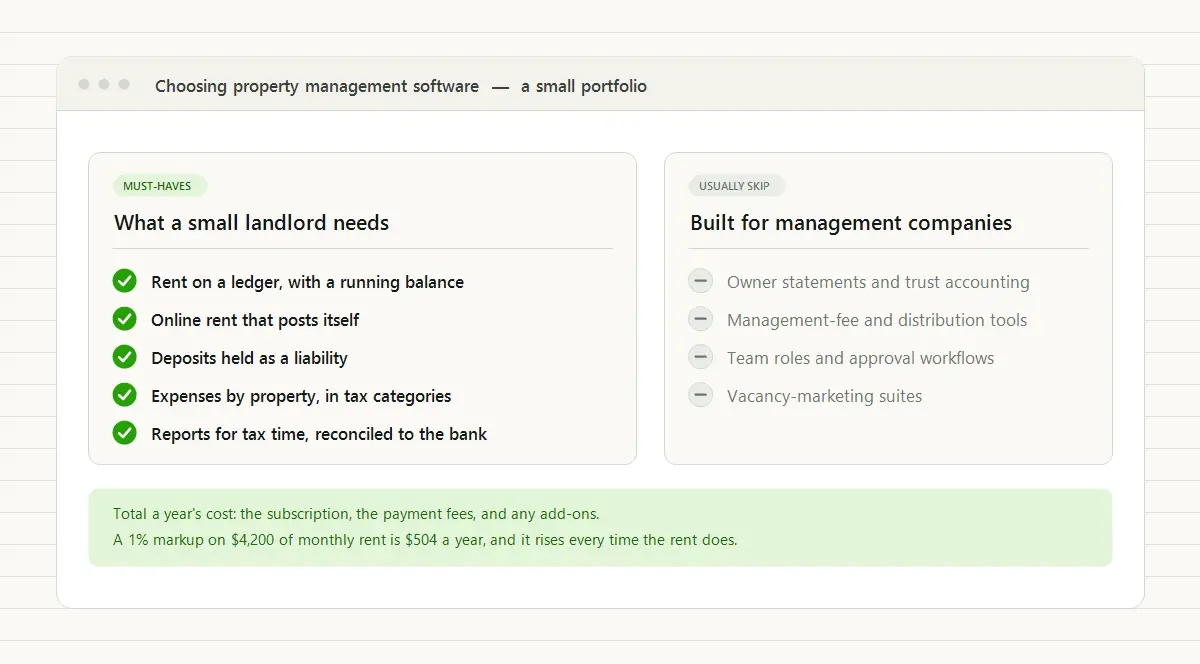
Property management software for a small landlord has four jobs: post the rent and keep a running balance for every tenant, let tenants pay online with the payment landing on their ledger, hold each security deposit as money you owe back, and record income and expenses by property so tax time is a report instead of a reconstruction. Reports and bank reconciliation come out of those four; nearly everything else is optional at this size. The pricing model matters almost as much as the features, because a structure that is fair to a large portfolio can quietly overcharge a small one.
Most American rentals look like yours. In TenantLedger’s tabulation of the Census Bureau’s 2024 Rental Housing Finance Survey, 82.9% of U.S. rental properties contain a single unit, and individual investors own 59.6% of those (the full numbers are in rent collection statistics). Yet much of the software, and much of the advice about choosing it, is written for management companies with staff and owner clients. This guide is for the other case: you own the rentals, you collect the rent, you call the plumber, and you report it all on your tax return.
What counts as a small landlord when you’re choosing software?
For software purposes, the useful definition isn’t a number of doors. It’s how the work gets done. A small landlord, in the sense that matters here:
- owns the rentals directly or through their own LLC, rather than managing property for other owners;
- does the work personally, often alongside a day job, with a spouse or partner as the only staff;
- reports the rental income and expenses on their own return, usually on Schedule E, or hands the numbers to an accountant who does.
That profile changes the shopping list. You don’t need owner statements, trust accounting, or management-fee calculations, because there’s no owner client to report to and no fee to take. You do need books good enough for a tax return, because the reporting is yours: the IRS says rental income and expenses can generally go on Schedule E (Topic 414). And everything has to take minutes a month, because the hours come out of your evenings.
What does a small landlord need from property management software?
Five things, the first four of which are the jobs above, plus the reports that prove the books are right.
A ledger that posts the rent and keeps the balance
This is the core. Each lease should carry a recurring rent charge that posts on schedule, and each payment should apply against the charges without overwriting them. A partial payment on the 4th and the rest on the 12th should leave a dated history and a balance that is computed, never typed. Late fees, utility reimbursements, and one-off charges belong on the same ledger as separate charges. That record is what you show a tenant who disputes a balance, and it’s what a rent ledger is.
Online rent that posts itself
Small properties are where online payment is least common. In the same Census tabulation, only 34.8% of U.S. rental properties that reported a payment method accept online payment, but measured by rental units the figure is about 54%, because large buildings offer it as a matter of course. Look for a tenant portal that works in a phone’s web browser with no app to install, takes bank transfers as well as cards, and posts each payment to the tenant’s ledger without you keying it in.
Then check what each payment costs, whether the software adds anything to the processor’s rate, and who pays it. The difference is real money: at Stripe’s standard rates, a $1,400 rent paid by card costs $40.90 (2.9% plus 30¢), while the same rent paid by bank transfer costs $5 (0.8%, capped at $5). Here’s how a tenant portal with online payment works.
Security deposits held as a liability
A deposit you may have to return isn’t income when you collect it (Topic 414 again). It’s money you owe back. The software should record each deposit against its lease as a liability, keep it out of rental income, and show the total you’re holding at any moment, so move-out is arithmetic. Two exceptions to know: a deposit that the lease says will be used as the final month’s rent is advance rent, which is income when you receive it, and any part of a deposit you keep at move-out is income in the year you keep it. Security deposit accounting covers the entries.
Expenses by property, in the categories your return uses
Every bill, repair, and insurance premium should be recorded against the property it belongs to and a category in a chart of accounts. If those expense categories echo the lines of Schedule E (repairs, insurance, taxes, utilities, mortgage interest, and the rest), the year-end summary maps onto the return almost line for line. Setting up a chart of accounts for rental properties has a starter list.
Reports your accountant can use
At this size you’ll run a handful of reports, but they have to be right:
- Income and expenses by category for the year, per property and in total. This is the report your Schedule E is built from.
- A rent roll and a delinquency list, for the 5th of the month, when you want to know who hasn’t paid.
- A tenant statement, one tenant’s charges and payments over a date range, for disputes and for a tenant’s next landlord or lender.
- A balance sheet, which shows the deposits you’re holding as what they are: money you owe.
Underneath them sits bank reconciliation, the monthly check of your books against the bank statement. Software that can’t reconcile can’t tell you whether its reports are right. Bank reconciliation for landlords shows the routine.
A maintenance log is the nice-to-have: a work order per job with the date, the unit, and the vendor, and the vendor’s bill recorded against the property, so you know when the water heater was last serviced and how many times the same faucet has failed. At this size it’s a convenience, not a requirement.
What can a small landlord skip?
A lot of what gets sold as essential is built for companies with staff and clients. You can usually skip:
- Owner statements, owner portals, and trust accounting. They exist for managers who report to property owners. The exception is a rental you co-own with a sibling, or a parent’s house you look after, where a read-only owner view saves a lot of explaining.
- Management-fee and distribution tools. There’s no fee to calculate when the owner is you.
- Team roles and approval workflows. One login, maybe two, covers it.
- Vacancy-marketing suites. You fill a vacancy every year or two, not every week. A listing on the sites renters already search, plus a short page about the property, does the job.
- Bundled applicant screening. Screening applicants matters, but any screening service of your choice can do it; it doesn’t need to live where you keep your books. The tenant screening checklist covers what to ask applicants first.
The test for anything on a feature list: would you use it this month? If not, it shouldn’t raise your price or crowd the screen you open on the 1st.
How should a small landlord compare pricing?
Before comparing feature lists, total what a year would actually cost. Four lines cover it:
| Cost line | What to check |
|---|---|
| Subscription | Whether there’s a monthly minimum, so a small portfolio pays for units it doesn’t have, and whether the plan you need is the entry tier or two tiers up |
| Features behind tiers | Whether accounting, bank reconciliation, or online payments sit in a higher plan than the price you were shown |
| Payment fees | What a tenant pays per online payment, whether the software adds a markup on top of the processor’s rate, and whether you choose who covers it |
| Contract and setup | Annual commitments, onboarding fees, and what it takes to cancel |
The line people miss is payment fees. A free plan has to earn its money somewhere, and some earn it from the rent: a per-payment fee charged to the tenant on top of processing, a markup on the processing rate, or paid add-ons for the pieces you end up needing. Read the fee schedule for the payment method your tenants will actually use, then run the arithmetic on your own rents. A 1% markup on $4,200 of monthly rent is $504 a year, more than many subscriptions cost, and it rises every time the rent does.
A modest subscription with standard processing fees often costs less over a year than a plan that takes a percentage of the rent, and its cost stays visible. What property management software costs explains the three common pricing models in more detail.
Do you need property management software, or will a spreadsheet do?
Sometimes a spreadsheet is enough. One long-term tenant who pays by bank transfer on the 1st, a deposit that’s sitting quietly in its own account, and expenses you can list from one card statement: a well-kept spreadsheet and a separate checking account for the rental will get you through tax season.
You’ve outgrown it when the record stops answering questions on its own: what a tenant owes right now, which deposit belongs to whom, what a property cost you this year. The full list of signs is in how to tell if you need it, and how to track rent payments without a spreadsheet covers making the switch.
If you already keep a business in QuickBooks Online, you can record rent there too. It works, but QuickBooks doesn’t know what a lease is: tenants become customers, rent becomes an invoice, and a deposit becomes an item pointed at a liability account. How to record rent payments in QuickBooks shows the full workflow, which is also a fair picture of the work rental software does for you.
How do you test property management software in a free trial?
A trial only tells you something if you put a real lease through it. Pick your most complicated tenant, the one with a partial payment or a fee on the ledger, and spend one evening on this:
- Add one property, its units, and the current lease, with the rent, the dates, and the deposit you’re holding. If that takes more than a few minutes, everything else will too.
- Set up the recurring rent charge and check that the next one is scheduled for the right date and amount.
- Record last month the way it really happened: the partial payment, the fee, the second payment. Then check the balance against what you know the tenant owes.
- Look at the tenant’s side. Put a second email address of your own on that tenant’s record for now, so nothing reaches your real tenant, enable the portal, and sign in on your phone to see the balance and history your tenant would see. Once online payments are connected, the same screen shows how to pay.
- Enter two real bills against the property, say a repair and an insurance premium, and see where they land.
- Run the year-end reports: income and expenses by category for the property, and the balance sheet with the deposit on it. Ask whether you could hand them to your accountant as they are.
- Read the exit terms. Find out how to cancel and how you’d get your records out before you depend on it.
If the software gets through all seven, it will handle an ordinary month. If it stumbles on step 3, keep looking: partial payments are where rent tracking either works or doesn’t.
Mistakes small landlords make choosing software
- Choosing on payments alone. A payment app can tell you who paid. It can’t reconcile, hold deposits as a liability, or produce a balance sheet, because there are no books underneath it.
- Buying for the portfolio you hope to have. Choose for this year’s work. If the price scales with your portfolio and no features are held back for bigger plans, growth won’t force a switch later.
- Importing years of history. Pick a cutover date, enter current balances and deposits, and keep the old spreadsheet as the archive. Nobody needs 2019 in the new system.
- Mixing rental and personal money. A separate checking account for the rentals, and a separate one for deposits where your state requires it, makes every report simpler and every reconciliation shorter.
How TenantLedger fits a small landlord
TenantLedger is built around the four jobs above, with real accounting underneath: a chart of accounts, a balance sheet, and bank reconciliation.
- Rent on a ledger. Recurring charges post on schedule per lease, payments apply against the charges, and every tenant has a running balance, a dated history, and a statement you can print.
- Online rent through your own Stripe account. Tenants pay by card or bank transfer from a portal that runs in any browser, with no app to install, and each payment posts to their ledger. TenantLedger adds no markup to Stripe’s standard fees, and one setting decides whether you absorb the fee or pass it to the tenant, where your state and lease allow it.
- Deposits as a liability, recorded on the lease from move-in to return and shown on the balance sheet.
- Bills and expenses by property, with vendors, check printing, and work orders for the maintenance history.
- Reports for tax time: the cash flow report by category, per property or for everything, plus the rent roll, delinquency, the balance sheet, and monthly bank reconciliation. If your accountant works in QuickBooks Online, you can also export to QuickBooks.
- An owner portal if you need one, for the rental you co-own or the parent’s house you look after: read-only, and limited to that owner’s properties.
Pricing starts at $20 a month and scales with the size of your portfolio, with every feature included at every size, no contract, and cancel anytime. TenantLedger doesn’t screen applicants or syndicate vacancy listings: use a screening service of your choice and the listing sites renters already search, then add the lease once it’s signed.
The bottom line
For a small landlord, the right property management software does four things well (rent on a ledger, online payments that post themselves, deposits held as a liability, and expenses by property) at a price that doesn’t punish a small portfolio. Skip the features built for management companies, total the real annual cost including payment fees, and put one real lease through a trial before you decide.
If you want to run that test on TenantLedger, the 14-day free trial takes an evening to set up: start here, no credit card required.
Common questions
What is the best property management software for small landlords?
For a small landlord, the best one is the one that does four jobs well: it posts rent and keeps a running balance for every tenant, takes online payments that post to the tenant's ledger, holds security deposits as money you owe back, and records expenses by property in categories your tax return uses. Beyond those, compare the total cost of a year, including payment fees, and put one real lease through a free trial before you commit.
What property management software features can a small landlord skip?
Most of what is built for management companies with staff and owner clients: owner statements and trust accounting, management-fee and distribution tools, team roles and approval workflows, and vacancy-marketing suites. The exception is a rental you co-own with family or look after for a relative, where a read-only owner view is worth having. A simple test for anything else on a feature list: would you use it this month?
How much should property management software cost a small landlord?
Compare a full year, not the headline price: the subscription, any monthly minimum, features held back for higher tiers, fees on online payments paid by you or your tenants, and any contract or setup fee. A modest subscription with standard processing fees often costs less over a year than a plan that takes a percentage of every rent payment. TenantLedger starts at $20 a month with every feature included at every size.
Is free property management software really free?
It depends on the fee schedule. Some free plans charge tenants a fee on each online payment on top of processing, mark up the processing rate, or sell the pieces you need, such as accounting, as paid add-ons. Read the fee schedule for the payment method your tenants will actually use. A percentage taken from every rent payment is a real cost even when it never appears on your bill, and it grows each time the rent does.
Can I use QuickBooks instead of property management software?
Yes, especially if you already run a business in QuickBooks Online. Tenants become customers, rent becomes an invoice, payments are applied and grouped into bank deposits, and a security deposit becomes an item pointed at a liability account. It works, but QuickBooks does not know what a lease is, so the rental-specific work stays manual. Some landlords keep the property records in rental software and export the books to QuickBooks for their accountant.
How long does it take to set up property management software?
For a small portfolio, about an evening, as long as you start from a cutover date instead of importing years of history. Add your properties, units, and current leases, enter each tenant's balance as of the cutover, record the deposits you are holding, and let rent post from there. Your old spreadsheet stays as the archive for anything before that date.
Property management software with real accounting built in
Track your properties, leases, charges, and payments in one place.
14-day free trial · No credit card required