
How to Record Rent Payments in QuickBooks Online
October 26, 2026
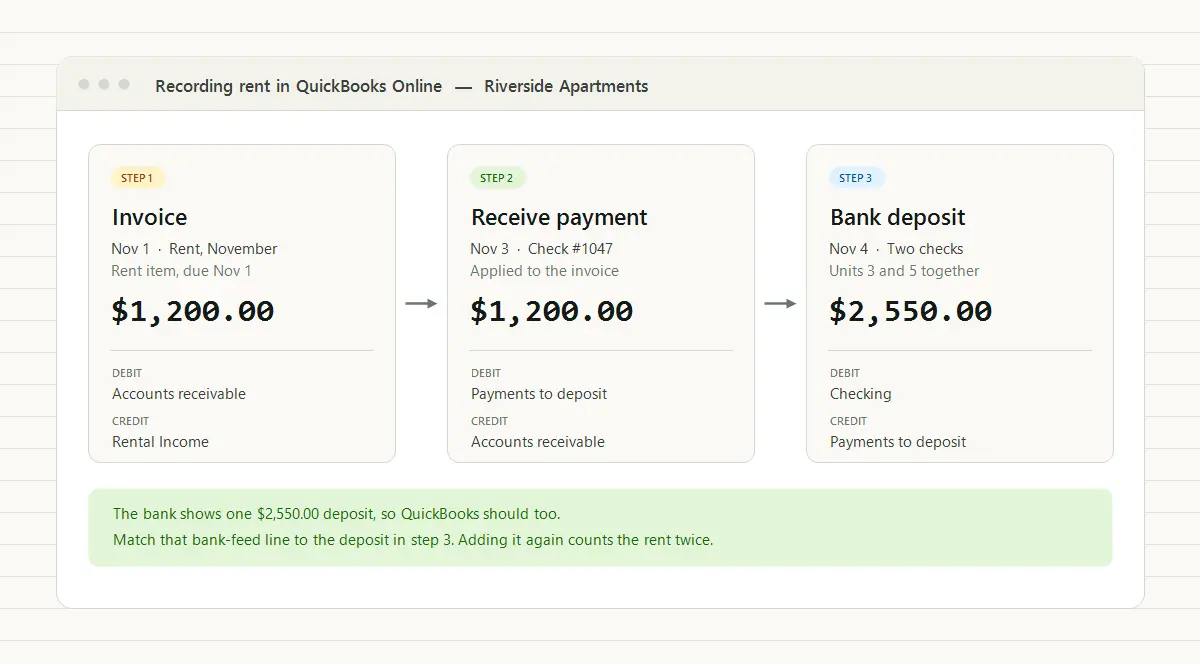
To record a rent payment in QuickBooks Online, enter it with Receive payment against the tenant’s rent invoice, or with a sales receipt if you don’t invoice rent. Either way, the rent should post to a Rental Income account, wait in Payments to deposit until you group it into a bank deposit, and then be matched to the deposit line in your bank feed. Never add that bank-feed line as new income on top, or the same rent gets counted twice.
That’s the short version. The rest of this guide covers the one-time setup that makes it work, a worked example with the journal entries behind each step, and the situations that cause most rent errors in QuickBooks: partial payments, prepaid rent, security deposits, late fees, and processor fees.
QuickBooks moves its menus around from time to time, so this guide names the forms (Invoice, Receive payment, Sales receipt, Bank deposit) rather than click paths. The forms themselves have stayed put. One account name varies: the holding account this guide calls Payments to deposit is still labeled Undeposited Funds in some company files. It is the same account.
How should you set up QuickBooks for rent?
Do this once, before you record a single payment. It takes about half an hour and decides whether your reports mean anything later.
-
A Rental Income account. An income account for rent, plus separate income accounts for late fees and any other fees you bill, so they don’t blend into rent. If you’re building the list from scratch, start with this chart of accounts for rental properties.
-
A Security Deposits Held account. Type Other Current Liability. A deposit you plan to return is money you owe, not money you earned, and IRS Publication 527 says not to include it in income when you receive it.
-
A product or service for each kind of charge. Create a service item called Rent that posts to Rental Income. Add Late Fee (to your late fee income account), Security Deposit (to the liability account), and anything else you bill, such as pet rent or a utility reimbursement. The item is what sends each invoice line to the right account.
-
A customer for each tenant. If roommates share one lease and pay one combined rent, a single customer for the lease is simplest, because they share one balance. If each roommate pays their own share, give each one a customer and invoice each their portion. A display name that starts with the property and unit, such as “Riverside 3 - Avery”, keeps the customer list sorted by building.
-
A way to tell properties apart. Schedule E reports each rental property separately, so your books have to split them too. On QuickBooks Online plans with class tracking (Plus and Advanced, as of this writing), give each property a class and tag every rent line and expense with it. Without classes, you can make each property a parent customer with its leases as sub-customers. That splits income by property. Expenses split the same way only if your plan lets you tag each expense line to a customer, so treat it as a partial answer.
Invoice or sales receipt: which should you use for rent?
QuickBooks gives you two ways to record rent, and they answer different questions.
| Invoice + Receive payment | Sales receipt | |
|---|---|---|
| What it records | What the tenant owes, then what they paid | Only what arrived |
| Shows who is behind | Yes, in the A/R Aging report | No |
| Handles a partial payment | Yes, the invoice stays open for the rest | No, you track the shortfall somewhere else |
| Monthly work | An invoice (which can be recurring) plus a payment | One form per payment |
| Best for | Anyone who needs to know who owes what | A tenant who always pays in full and on time |
Use invoices unless every tenant pays in full, on time, every month. A sales receipt can’t tell you a tenant is behind, because it never knew the rent was due. Invoices can, and they are the only method that gives you a real rent ledger inside QuickBooks: dated charges, dated payments, and a running balance per tenant. Open invoices also feed the A/R Aging report (A/R is accounts receivable, the rent your tenants owe you), which lists who is behind and by how much. Depending on your plan, QuickBooks can create the monthly rent invoice for you as a recurring transaction, so the invoice side is mostly a one-time setup per lease.
How do you record a rent payment against an invoice?
-
Create the rent invoice. Customer: the tenant. Invoice date and due date: the day rent is due. Line: the Rent item, the monthly amount, and the property’s class if you use classes. For a move-in month, bill the prorated amount; the prorated rent calculator does the math.
-
Record the payment with Receive payment when the money arrives. Choose the customer, tick the open invoice, and enter the date you actually received the money (not the due date), the payment method, and the check or reference number. For Deposit to, choose Payments to deposit if you take several payments to the bank together. If each payment reaches the bank as its own line, you can deposit straight to the bank account instead.
-
Group the payments into a bank deposit. On the day you deposit, open Bank deposit, tick the payments that went to the bank together, and save it to the checking account. The deposit total should equal the deposit on your bank statement to the cent.
-
Match the bank feed. When the deposit comes through your bank connection, QuickBooks usually suggests a match to the deposit you recorded. Confirm the match.
Match, don’t add. Clicking Add on a bank-feed deposit instead of matching it records the same rent a second time, and your Profit and Loss overstates income. If the payments were still waiting in Payments to deposit, they stay there indefinitely. If you had already made the bank deposit, checking shows the money twice. It is one of the most common rent errors in QuickBooks, and it stays invisible until someone asks why the books show more rent than the bank received.
A rent payment in QuickBooks, start to finish
Here are two units at Riverside Apartments. Unit 3 pays $1,200.00 and Unit 5 pays $1,350.00, both due on November 1. Both tenants pay by check on November 3, and you take the checks to the bank together on November 4.
| Date | Form | Customer | Amount | Where it posts |
|---|---|---|---|---|
| Nov 1 | Invoice | Riverside 3 | $1,200.00 | Rental Income, via the Rent item |
| Nov 1 | Invoice | Riverside 5 | $1,350.00 | Rental Income, via the Rent item |
| Nov 3 | Receive payment, check #1047 | Riverside 3 | $1,200.00 | Payments to deposit |
| Nov 3 | Receive payment, check #3318 | Riverside 5 | $1,350.00 | Payments to deposit |
| Nov 4 | Bank deposit, both checks | $2,550.00 | Checking |
Your bank statement shows one line for all of that: a $2,550.00 deposit on November 4. That is why the bank deposit step exists. The bank saw one deposit, not two payments, and grouping them the same way in QuickBooks gives the bank feed exactly one transaction to match.
The journal entries behind it
QuickBooks writes these for you. They are still worth knowing, because they are how you check the work:
| Step | Debit | Credit | Amount |
|---|---|---|---|
| Invoice the rent (both units) | Accounts receivable | Rental Income | $2,550.00 |
| Receive the two payments | Payments to deposit | Accounts receivable | $2,550.00 |
| Deposit the checks | Checking | Payments to deposit | $2,550.00 |
If you use sales receipts instead of invoices, the first two rows collapse into one: debit Payments to deposit, credit Rental Income, $2,550.00. The deposit row is the same either way.
After the deposit, accounts receivable is back to zero for both units, Payments to deposit is back to zero, and checking is up $2,550.00, matching the bank. If Payments to deposit still holds a balance at month end, something was received and never grouped into a deposit.
These entries are bookkeeping. For taxes, individual landlords generally report rental income on Schedule E, and Publication 527 sets the timing rules for items like advance rent and deposits, which come up below. Whether your books run on cash or accrual is a separate choice, covered in the basic landlord accounting guide.
How do you handle partial payments, prepaid rent, deposits, and fees?
A partial payment. Receive the amount the tenant actually paid against the invoice. The invoice stays open for the remainder, and the A/R Aging report shows the shortfall. Don’t edit the invoice down to match what they paid; that erases the fact that they owe the rest.
Prepaid rent. A tenant pays January’s rent in December, before the January invoice exists. Record it with Receive payment and leave it unapplied. It sits as a credit on the tenant’s account until you create the January invoice, and then it is applied to that invoice (QuickBooks can apply credits automatically, or you can do it yourself).
That payment also crosses a year-end, so flag it for your tax preparer. Publication 527 treats advance rent as income in the year you receive it, whatever period it covers and whichever accounting method you use. Your reports may say otherwise. On accrual books, the Profit and Loss puts the rent in January, the month of the invoice, so it lands in next year’s books but this year’s taxes. On cash-basis reports it shows in December, the month the money arrived, on a line QuickBooks calls Unapplied Cash Payment Income until the credit is applied to an invoice.
A security deposit. Bill it on the move-in invoice with the Security Deposit item, so the payment lands in the liability account and not in rent. If your state requires deposits in a separate bank account, deposit the payment there. When you keep part of a deposit at move-out, that part becomes income in the year you keep it. One exception: a “deposit” that will be used as the last month’s rent is advance rent under Publication 527, so it belongs in rental income when you receive it, not in the liability account. The full lifecycle is in security deposit accounting for landlords.
A late fee. Bill it as its own line or invoice with the Late Fee item, never by raising the rent line. A separate income account keeps your rent total honest, and it keeps the fee distinguishable if the tenant disputes it. Many states cap late fees; the late fee calculator lists the ones that do.
An online payment with a processing fee. If a payment processor deposits the rent minus its fee, still record the full rent payment from the tenant. Then, on the bank deposit, add a line for the fee as a negative amount coded to a bank or merchant fees expense account. The deposit now equals what the bank received, and the tenant’s balance shows the rent paid in full.
A bounced check. Don’t delete the payment. Record the return as its own transaction on the day the bank sent it back, so the rent is owed again, and bill any returned-payment fee as a separate charge. The full walkthrough, with the journal entries, is in how to record a bounced rent payment.
Mistakes that make rent in QuickBooks wrong
- Adding bank-feed deposits instead of matching them. The same rent is counted twice, and Payments to deposit fills up with payments that never clear. That account should be close to zero after each deposit; a growing balance is the first sign of duplicated or missing entries, and monthly bank reconciliation is where you catch it.
- Recording rent only from the bank feed. Categorizing every deposit as Rental Income gets the total roughly right but records nothing about who paid. You can’t tell which tenant is behind, and a security deposit or a returned check gets filed as rent.
- Booking a security deposit as rent. Income is overstated, and the books no longer show what you owe back at move-out.
- Dating payments on the due date. The payment date is the day the money arrived. Backdating it hides late payments and throws off the bank match.
- Lumping every property into one income line. Without a class or customer structure per property, the separate Schedule E columns for each property have to be rebuilt by hand at tax time.
How TenantLedger sends rent to QuickBooks
QuickBooks is general-purpose accounting software. It handles everything above, but it doesn’t know what a lease is: there are no lease dates, no rent schedule tied to a unit, and no deposit attached to the lease it came from. That’s why plenty of landlords run the tenant side in property management software and keep QuickBooks as the books their accountant works in.
TenantLedger’s QuickBooks Online sync creates the invoices and payments from steps 1 and 2 for you when you export. In the link wizard, you first match your chart of accounts, tenants, vendors, bank accounts, and charge types to their QuickBooks counterparts (or create the tenant or vendor in QuickBooks from the wizard), and you link new ones as you add them. Each tenant links to their own QuickBooks customer, and each charge billed to a named tenant exports as a QuickBooks invoice for that tenant, using the product or service you linked to its charge type. Each payment exports as a QuickBooks payment applied to the invoices it paid. A payment can’t be sent before the charges it pays, which keeps the invoice-and-payment chain intact.
Exports run when you choose. You pick a type and date range, and each record is labeled Needs to be Exported, Up to Date, or Needs to be Updated, so you can see what still has to go across before you send it. Payments arrive in QuickBooks without a bank account attached, so they wait in Payments to deposit, and you group them into the bank deposit there, exactly as in step 3, before matching the bank feed. Bills, bill payments, and refunds of rent and fees can go across the same way.
A few things stay in QuickBooks. Rent on a lease whose payment responsibility is shared (Multiple Responsibility) isn’t tied to one tenant, so it doesn’t export; leases set to Individual Responsibility export normally. Exported invoices and bills don’t carry a class or location, so if you split properties by class, tag them there. Security deposit refunds aren’t exported either, so record those in QuickBooks directly. The help articles on connecting QuickBooks and exporting your data to QuickBooks walk through the setup.
The bottom line
However the entries get into QuickBooks, the month-end check is the one from the worked example: Payments to deposit at zero, checking matching the bank statement to the cent, and every tenant’s balance showing what they really owe. Keep those three true every month, and your books will agree with both the bank and your tenants.
Common questions
How do I record rent payments in QuickBooks Online?
Set each tenant up as a customer and create a Rent product or service that posts to a Rental Income account. Each month, invoice the rent, then record the tenant's payment with Receive payment against that invoice on the day the money arrives. Group the payments you took to the bank together into a bank deposit, and match that deposit to the line in your bank feed instead of adding it as new income.
Should I use an invoice or a sales receipt for rent in QuickBooks?
Use an invoice with Receive payment if you need to know who owes rent. The invoice records what was due, so a late or partial payment shows up in the A/R Aging report. A sales receipt only records money that arrived, so it can't tell you a tenant is behind. Sales receipts are fine for a tenant who always pays in full and on time, but most landlords are better served by invoices.
What account should rent income go to in QuickBooks?
An income account named something like Rental Income, reached through a Rent product or service on the invoice or sales receipt. Keep late fees, pet rent, and other fees in their own income accounts so your rent total stays clean. Security deposits are not income at all and belong in a liability account.
How do I record a security deposit in QuickBooks?
Create an Other Current Liability account such as Security Deposits Held, and a Security Deposit product or service that points to it. Bill the deposit on the move-in invoice with that item, so the payment lands as a liability you owe back rather than as rent. Under IRS rules, a deposit you plan to return is not income when you receive it. Any part you later keep becomes income in the year you keep it. A deposit that will be used as the last month's rent is different: the IRS treats it as advance rent, which is income when you receive it.
Why is my rental income doubled in QuickBooks?
Usually because the rent was recorded twice: once with Receive payment or a sales receipt, and again when the matching deposit in the bank feed was added as new income instead of matched. Two common tells are payments stuck in Payments to deposit (or Undeposited Funds) that never clear, and a QuickBooks checking balance higher than the bank's. Undo the added bank-feed transaction, group any waiting payments into a bank deposit, then match the bank line to that deposit.
How do I track rent by property in QuickBooks?
On QuickBooks Online plans that include class or location tracking, give each property a class and tag every rent line and expense with it, then run Profit and Loss by Class. On plans without it, you can make each property a parent customer with its leases as sub-customers. That splits income by property. Expenses split the same way only if your plan lets you tag each expense line to a customer. Schedule E reports each rental property separately, so the books need to split them one way or another.
Property management software with real accounting built in
Track your properties, leases, charges, and payments in one place.
14-day free trial · No credit card required