
How to Record a Bounced Rent Payment (NSF) in Your Books
October 9, 2026
The deposit slip says the rent is in. Your ledger says the tenant is paid up. Six days later the bank sends a notice: the check came back for insufficient funds, and everything you recorded that week is now wrong.
A returned rent payment is one of the few things that makes your books wrong after you did everything right. Fixing it takes five steps, and doing them in the right order is what keeps a single bounced check from turning into a reconciliation problem a month later.
What goes wrong when a rent payment bounces
Three records are off at the same moment:
- The tenant ledger shows the rent as paid. The tenant thinks it is paid, too.
- Your bank balance in the books is higher than the real balance, because the money left again.
- The owner statement, if you manage for owners, counts rent that never actually arrived.
Fix only one of those and the other two quietly disagree with it. The steps below fix all three together.
How to record a returned rent payment, step by step
-
Get the facts from the bank notice. You need the return date, the amount, the reason (insufficient funds, closed account, stop payment), and any fee your bank charged you for the returned item. The reason matters for what you do next. Insufficient funds is a different conversation with the tenant than a closed account.
-
Reverse the payment on the date the bank returned it. Not the original due date, and not the day you deposited it. Until the bank sent it back, the money really was in your account, so your books should show that. The reversal is a new entry dated the day the return happened.
-
Reopen the rent charge. The tenant owes the full rent again, and the charge keeps its original due date. If the payment had been applied across more than one charge, such as rent plus a utility reimbursement, every one of those charges reopens.
-
Bill the returned-payment fee as its own charge, if your lease provides for one. Keep it separate from the rent and separate from any late fee, and post it to an income account of its own. Many states regulate or cap these fees, so check your lease and local rules first.
-
Record the replacement as a new payment. New date, new method, new reference. If the first payment bounced, plenty of landlords require certified funds for the replacement. That is a lease and policy decision, not an accounting rule.
Reverse it, don’t delete it. Deleting the payment erases the evidence that it ever happened. A reversal keeps both lines, the payment and its return, which is what lets you explain the balance to a tenant, an accountant, or a judge.
A returned rent payment, shown in a ledger
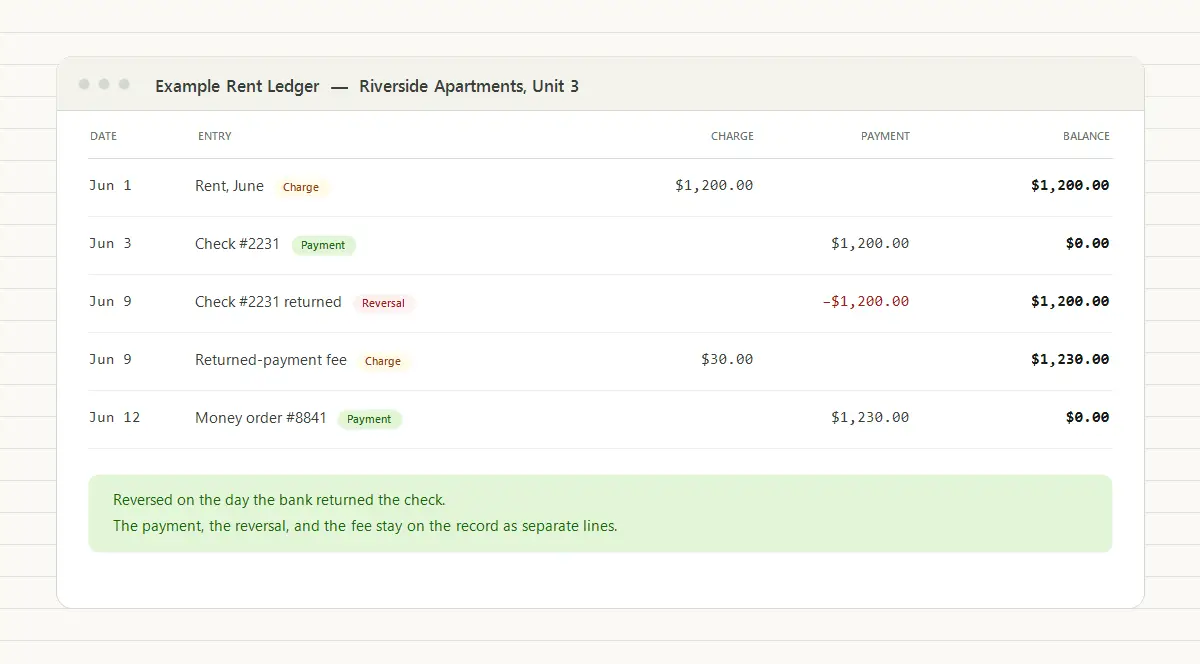
Here is Unit 3 at Riverside Apartments. Rent is $1,200.00 due on the 1st, and the lease sets a $30.00 returned-payment fee.
| Date | Type | Description | Charge | Payment | Balance |
|---|---|---|---|---|---|
| Jun 1 | Charge | Rent, June | $1,200.00 | $1,200.00 | |
| Jun 3 | Payment | Check #2231 | $1,200.00 | $0.00 | |
| Jun 9 | Reversal | Check #2231 returned, insufficient funds | −$1,200.00 | $1,200.00 | |
| Jun 9 | Charge | Returned-payment fee | $30.00 | $1,230.00 | |
| Jun 12 | Payment | Money order #8841 | $1,230.00 | $0.00 |
The payment, its reversal, the fee, and the replacement are four separate lines. Read the history top to bottom and the story is complete: the check cleared the ledger on the 3rd, came back on the 9th, and the tenant made good on the 12th, fee included.
The bank side of the same story looks different, and that is expected:
| Date | Bank statement line | Amount |
|---|---|---|
| Jun 3 | Deposit, check #2231 | +$1,200.00 |
| Jun 9 | Returned item, check #2231 | −$1,200.00 |
| Jun 9 | Returned-item fee charged by your bank | −$12.00 |
| Jun 12 | Deposit, money order #8841 | +$1,230.00 |
Every line has a partner on the tenant ledger except the $12.00. That is your bank’s fee, normally your expense (or the owner’s, if your management agreement says so). The $30.00 the tenant owes you is separate income, and mixing the two up is one of the most common errors with returned payments.
The journal entries behind it
If your software reverses the payment for you, you never type these. They are still what it should be doing, and it is worth knowing them when you check the work:
| Step | Debit | Credit | Amount |
|---|---|---|---|
| Reverse the returned payment | Accounts receivable | Bank | $1,200.00 |
| Bill the returned-payment fee | Accounts receivable | Returned-payment fee income | $30.00 |
| Your bank’s returned-item fee | Bank charges (expense) | Bank | $12.00 |
| Record the replacement payment | Bank | Accounts receivable | $1,230.00 |
These entries are ledger bookkeeping, not tax timing. If you report rental income on the cash method, it is taxable in the year you actually or constructively receive it, according to IRS Publication 527. A check that comes back unpaid did not deliver the money, so if a return straddles a year-end, ask your tax preparer how to treat it rather than guessing.
Situations that make a returned payment messier
A returned online or ACH payment. The ledger treatment is identical: reverse it on the date the return arrives. The difference is timing. Returns for insufficient funds usually come back within a few banking days, but a dispute over an unauthorized electronic withdrawal can come much later. The federal rule behind that, Regulation E, gives a consumer 60 days after the bank sends the statement showing the error. A payment that looks settled can still reverse weeks later.
The returned payment was a security deposit. A deposit is a liability, not income, and the deposit amount on your books should match the deposit cash you actually hold. A bounced deposit means you hold less than you recorded, so it has to be reversed too. See security deposit accounting for how the liability is supposed to move.
You already paid the owner. If you sent the owner their share of that rent, reversing the payment leaves the owner’s balance negative: you disbursed money that never arrived. This is the situation to handle carefully. Do not plug it with an adjusting entry. Show the reversal as its own line on the owner’s next monthly statement and recover it from the next payout or from the tenant. Depending on your management agreement and your state’s trust-accounting rules, you may need to cover the shortfall from your own funds until you do, because one owner’s money should never quietly cover another’s. If you took a management fee on that rent and your agreement bases fees on collected rent, reverse the fee too.
The payment covered several charges. Confirm that every charge it paid reopens, not just the first one. A rent charge that still shows paid after a reversal is a balance the tenant will dispute and you will not be able to defend.
The grace period had already ended. If the return arrives after the grace period, whether a late fee now applies depends on your lease and your state. Decide it deliberately and post it as its own charge. The late fee calculator lists the states that cap late fees.
Mistakes that turn one bounced check into a month of cleanup
- Deleting the payment. Your ledger, bank statement, and owner statement stop agreeing, and the history can no longer explain why the balance moved.
- Editing the original payment down to zero. Same problem, with the added trouble that nothing records the return.
- Folding the fee into the rent charge. Once rent and fee are one number, you cannot tell what the tenant short-paid, and late-fee math gets muddy.
- Forcing the reconciliation with an adjusting entry. The returned item on your bank statement needs a matching entry in your books. A plug makes the numbers agree and hides the cause. See bank reconciliation for landlords.
- Waiting until reconciliation to record it. In the meantime the tenant’s statement says paid, and you may accept a second payment against a balance that is wrong.
How TenantLedger handles a returned payment
In TenantLedger you open the payment and choose Reverse Transaction from its Action menu. For a check, you can also do it from the deposit that holds it, on that payment’s row. You enter the date the bank returned it and an optional memo. To bill the tenant a fee, tick Add Bank Fee in the same form. Despite the label, that adds a charge to the tenant’s ledger, not the fee your own bank charged you. Pick an income account (new companies start with one called NSF Fee Income), a date, and the amount.
The reversal itself is all-or-nothing. The affected charges reopen (back to unpaid, or partly paid if other payments were also applied to them), the bank balance drops by the reversed amount, and the payment is marked REVERSED on the deposit, so both the payment and its return stay on the record. If you ticked Add Bank Fee, the fee is then added as its own charge on the tenant’s ledger. The reversal also shows up as its own item to clear when you reconcile, so the returned-item line on your bank statement has something to match.
Reversal is available once a payment is part of a deposit, and only while that deposit has not been reconciled. If it has been, undo the reconciliation first, then reverse. The full walkthrough is in the help article on reversing a deposit. For the bigger picture of how charges, payments, and reversals build into one history, see what a rent ledger is and how to keep an accurate rent payment history.
Common questions
What should I do when a tenant's rent check bounces?
Get the return date, amount, and reason from the bank notice, then reverse the payment in your records on the date the bank returned it. Reversing reopens the rent charge so the tenant owes it again. If your lease allows a returned-payment fee, bill it as its own charge, and record the replacement payment as a new entry with its own date and method. Do not delete the original payment.
How do I record a bounced rent check in my books?
Reverse the original payment on the date the bank returned it: debit accounts receivable and credit your bank account for the amount of the check. That puts the rent back on the tenant's balance and takes the money back out of your bank balance. Any returned-payment fee you bill the tenant is a separate entry to an income account, and any fee your own bank charged you is a bank-charges expense.
Should I delete a bounced payment from the tenant ledger?
No. Deleting erases the fact that the payment was ever recorded, so the ledger, your bank statement, and any owner statement stop agreeing with each other. A reversing entry keeps both the payment and its return on the record, so anyone reading the history later can see what happened and when.
Can I charge a tenant a fee for a returned rent payment?
Usually, if your lease provides for it. Some states also set their own rules or caps on returned-check fees, so check your lease and your state's rules before you charge one. Bill it as a separate charge, not as part of the rent, so the rent balance and the fee stay distinguishable.
How long after an online payment can it be returned?
A return for insufficient funds usually arrives within a few banking days. A dispute over an unauthorized electronic withdrawal can come later: under the federal Electronic Fund Transfer rules (Regulation E), a consumer has up to 60 days after the bank sends the statement showing the error to report it. A payment that looks settled can still reverse weeks afterward.
What if I already paid the owner for rent that bounced?
Reversing the payment leaves that owner's balance negative, because you disbursed money that never arrived. Do not plug the gap with an adjusting entry. Show the reversal on the owner's next statement as its own visible line and recover it from the next payout or from the tenant. Depending on your management agreement and state trust-accounting rules, you may need to cover the shortfall yourself until you do, so one owner's money is never quietly covering another's.
Property management software with real accounting built in
Track your properties, leases, charges, and payments in one place.
14-day free trial · No credit card required